Smilies and Mobile Post Editing

JanAtheCPA

Beloved Grand Eagle
@Forest, I discovered how to edit the Smilies collection when I was testing the software in February, and I put together (and saved) a collection that includes some of our favorites from the old version - I believe I know how to upload that and I wonder if you would mind if I tried it? They seem to be PC-specific, because I can't invoke the smilie menu on my phone - however Android smilies work now, which they did not (for me) in the old version.

Actually, none of the formatting or insertion items are available on the mobile (phone) version - even simple things like bold or italics. Is that on your To Do list?
 
@Forest, I discovered how to edit the Smilies collection when I was testing the software in February, and I put together (and saved) a collection that includes some of our favorites from the old version - I believe I know how to upload that and I wonder if you would mind if I tried it? They seem to be PC-specific, because I can't invoke the smilie menu on my phone - however Android smilies work now, which they did not (for me) in the old version.

Actually, none of the formatting or insertion items are available on the mobile (phone) version - even simple things like bold or italics. Is that on your To Do list?

That would be great. I do love those old classic smilies.

The editing commands show up well on my phone. I was able to post the following:

1785392311462.png
 
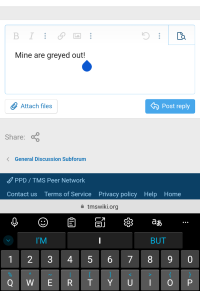
Mine are greyed out! But I'll dink around... with the smilies, too 😉
Screenshot_20260730-085136.png

EDIT: the issue is only on my phone when I'm using Edge for Android. In Firefox it's all fine. So that's good, it's probably just Edge not liking the new server.
1. A forced stop and clearing the cache made no difference.
2. I separately cleared the browsing data and cached images just for tmswiki.org, which made no difference.
3. I finally cleared all cookies for tmswiki.org, and that fixed it - after having to log back in, of course. I would hate to have to do that to other sites where I suspect that the cookies might possibly(???) be connected to really important stuff like my Wordle history :eek: (that would be because I play without an account armscrosseddenial😏)
 
Last edited:
That would be great. I do love those old classic smilies
Oh wow, on my PC the smilies library that I edited back in February is already there! Huh... for example, these are the two "old" ones that I use the most dancea:joyful: BUT they don't show up in either browser on my phone... well, I will research that.

FYIO at this point and to document possible solutions (ie, no need for Forest to spend time on this now) here is an AI overview of possible issues, generated on my google search for "smilies in xenforo don't show up on any android browser, only PC windows"
  • Third-Party Add-ons or Custom JavaScript: Mobile-specific plugins or heavily modified custom styles often break the Froala/XenForo editor toolbar integration on touch devices. Temporarily revert to the default XenForo style and disable add-ons to isolate the conflict. [1, 2]
  • Mixed Content / HTTP vs. HTTPS Errors: Mobile browsers strictly block insecure elements. Ensure your XenForo board URL and fullBase configurations enforce absolute secure https:// paths rather than mixed protocols. [1, 2]
  • Sprite Mode or Image Path Issues: If custom smilies use local directories that fail case-sensitivity checks on Android's Linux file system or have restricted permissions, mobile browsers will drop the image requests. Verify paths via the XenForo Admin Control Panel under Content > Smilies. [1]
 
Last edited:
Available on PC only: This is a screenshot of the first page of smilies - it starts with the new ones, then I had added back a number of the old ones when I was playing around on the test site in February:
1785444109668.png


plus these two that miss the screenshot capture (which only show up as text on the phone) fingersinearsarmscrosseddenial
 
Okay, I ended up working way more on this than I should have, but I've figured it out.

Unfortunately, there is some bad news: in the last 14 years, the way that people use smileys has changed dramatically. We used to use little pictures, and now we use emojis. The pictures that we used to use are more or less obsolete at this point, and in the long term we should move to regular emojis. New-style emojis, like Jan's 🦀 and Cactusflower's 🪇🪅⚗️🔮🦦 are great though (they're the future).

XenForo came with 12 smileys built into the software. XenForo replaced them with smileys in the upgrade. We also had an additional 63 of the old-style images, used across 1,129 posts. They came from an old-style smileys pack that has been abandoned since 2015. I figured out how to get them to still display correctly in the older posts, but they won't show up in the smiley picker for future posts. In contrast, the animated smileys were more popular. We had only nine of them, but they show up in 1,021 posts. Those will show up correctly in old posts and be available in the smiley picker for future posts. Ideally, we should remove them, but they're just too fun, and I think people would really miss them. I know I have strong memories of them.

Some of the emojis from the first 12 won't show up at the top, but their emoji versions are still available. You can find them through the search box, and once you use them, they'll show up in "Recently Used."
 
Last edited:
By the way, Jan, I think you can use the post editor now?

Does that mean that everything discussed in this thread is now solved?

By the way, if there are specific smileys in your screenshot that you really really want to bring back and that don't have emoji alternatives, it would be an option to bring some back.
 
Last edited:
Yup, did that on my phone, it translates to the PC just fine. Too bad about some of the others - the two I'll miss the most are
1785701856373.png
and
1785701879856.png
but they have perfectly good yellow-head replacements.

And I did NOT intend for you to spend a bunch of time on smilies, my friend!
1785701994825.png
1785701999789.png
1785702002837.png

(okay, I'm done - 😄
 
Back
Top