Forest
Beloved Grand Eagle
Hi everyone.
Occasionally, I want pictures or videos in my posts to "float" on the right while my words wrap around them, like you would see in a newspaper or magazine article. While I was installing some other functionality today, I added this feature.
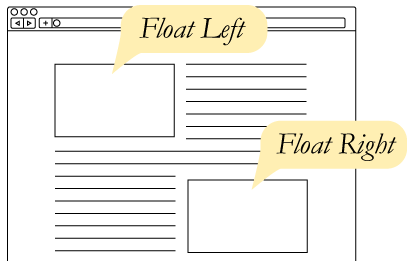 For example, to the right of this paragraph, you should see a diagram that illustrates what it looks like when something is floated on a web page. The diagram is a bit simplified, in black and white, but it shows one box that "floats" on the left hand side of the screen and one box that floats on the right hand side of the screen. And the entire black and white diagram is floating on the right side of this post.
To make this happen, I just pasted the diagram between two tags that appeared when I pressed the "float right" button that is now in the toolbar when you make a post. It looks like this:
 . The button makes it pretty easy to make things float right if you want to in your posts. You just click the button and then paste whatever you want in between the tags that appear. Likewise, you can move the tags around so that the thing floats where you want it to float. In this post, I put the tags right before the words, "For example," above.
Occasionally, I want pictures or videos in my posts to "float" on the right while my words wrap around them, like you would see in a newspaper or magazine article. While I was installing some other functionality today, I added this feature.
To make this happen, I just pasted the diagram between two tags that appeared when I pressed the "float right" button that is now in the toolbar when you make a post. It looks like this: