
Forest
Beloved Grand Eagle
I'd like to take a moment to introduce something that is easy to do but can make a big difference for our community and help spread the word about TMS.
What am I referring to? Well, after the first post of each thread, you may have seen something that looks like this:

Tags are just keywords that we can attach to threads that makes it easier for Google users and people on our site to find the threads. I'd like to encourage people, once you've read a thread, to take a look at the tags and see if you can make them better.
Here's how you do it: to add a tag, click on Edit Tags. Start typing your desired tag. Related tags should appear in a drop-down menu. For multi-word tags, you should be able to start typing any of the words in the tag and it will show up. For example, if you want to tag a post with "john e. sarno md" you could start typing "sarno" instead of "john" and the tag would still appear.
Click on the tag you want. If you want to add multiple tags, add a comma. This indicates to the tagging software that you are done typing your first tag and are ready to start entering a new one. Although it is not necessary, I would recommend adding a comma even if you are just using one tag.
There are only a finite number of tags (237 as of this writing), so if you start typing something and no options pop up, just try again with a synonym. It may take some persistence at first, but it gets easier as time goes on and we'll be rolling out tools to make it easier.
Once you have chosen an available tag, your tag should appear inside a blue box, like so:
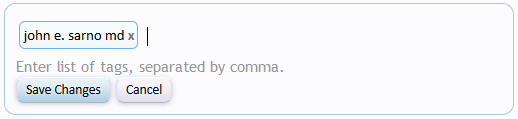 Click Save Changes to apply your tag(s) to the thread. It should show up instantly.
But why would we want to do this? Well, fundamentally tags are about making it easier for people to find threads that can help them. This is because tags are a hand-curated list of the best threads that we have on a whole host of topics. To see this for yourself, click the following link, which brings you to a list of all of our tags:
https://www.tmswiki.org/forum/tags/
By clicking on any of the tags, you can see threads related to the subject of the tag. Of course, you might not see many threads for some tags right now (especially the ones with the light background). However, that is exactly why we need your help - to make our tags a better resource for all members of the site who need help. Some day, that person who needs help might just be you!
You might not have seen tags around much so far, but over the coming years, you will see them more and more. We've been working on the tagging system for about 18 months now, and they are an important for the continued growth of our community.
One of the reasons why they are so important is that not only do they help people on our site find our threads, but they are also very good with helping people find our site. If we carefully apply appropriate tags to our best threads (not random tags and not to every thread), this teaches Google to send more people to our community, which helps us show more people that the mind-body connection can help them.
Overall, we'll want to exercise some restraint when tagging. We don't want to apply every tag to every thread. For example, if someone starts a thread about healing their back pain but doesn't really discuss Dr. Sarno himself, you wouldn't want to apply the "john e sarno md" tag to it because the thread is about a specific person's back pain rather than being about Dr. Sarno. In general, we want to apply more tags to our best threads and fewer tags to threads that would be relatively less interesting to third parties. In general, when you are considering tagging a thread, ask yourself the following question:
Will this tag help someone find information relevant to their search?
Returning to the example above, if someone was searching our site for "John Sarno" there would be other threads that would tell them more about Dr. Sarno than would the thread about someone's back pain, so the thread about the specific person's back pain shouldn't be tagged with "john e sarno md."
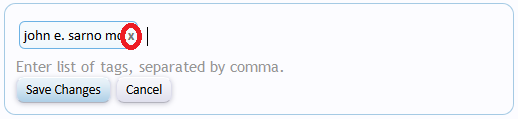
In fact, if people get overzealous, you may even want to remove some tags (sometimes people misunderstand how tags are meant to be used and apply every tag they can think of to a rather pedestrian thread). To remove a tag, just click "Edit Tags" and then click on the x mark, shown circled in red in the graphic below:
In general, though, if you think that someone who was searching for a given tag would be happy to find that thread, go ahead and tag it! Over time, we as a community will learn more about tagging and which tags are best to apply to a given thread. However, right now we just want to dive in and start using them. One of my students once said, "It's time to get our learn on," and, well, that's the way it is.
Eventually, I'd like to ask people who are committed to this site to join me in what will be called the "tagging team." Our community is volunteer run (thanks to @Ellen and @PamD who have been helping out hugely for a while), and my goal is to divide up responsibilities into very small tasks in the spirit of "many hands make light work." Being on the tagging team just means two things:
What makes this community so very special are the incredibly generous members who keep coming back to help others in pain. I don't love writing myself (you'd never guess it!), but I always love the terrific advice that I see posted in this forum and am inspired by the compassion that goes into posting it.
It may take weeks or even months, but I look forward to building a tagging team with the same enthusiasm as we see in the replies to threads. This will help the newcomers find the help they need, lift the overall discussion because we'll have easy access to the best old threads, and last but not least, bring new people into the conversation because they are able to find our site via Google and other search engines.
If you have any questions, feel free to ask them below!
What am I referring to? Well, after the first post of each thread, you may have seen something that looks like this:
Tags are just keywords that we can attach to threads that makes it easier for Google users and people on our site to find the threads. I'd like to encourage people, once you've read a thread, to take a look at the tags and see if you can make them better.
Here's how you do it: to add a tag, click on Edit Tags. Start typing your desired tag. Related tags should appear in a drop-down menu. For multi-word tags, you should be able to start typing any of the words in the tag and it will show up. For example, if you want to tag a post with "john e. sarno md" you could start typing "sarno" instead of "john" and the tag would still appear.
Click on the tag you want. If you want to add multiple tags, add a comma. This indicates to the tagging software that you are done typing your first tag and are ready to start entering a new one. Although it is not necessary, I would recommend adding a comma even if you are just using one tag.
There are only a finite number of tags (237 as of this writing), so if you start typing something and no options pop up, just try again with a synonym. It may take some persistence at first, but it gets easier as time goes on and we'll be rolling out tools to make it easier.
Once you have chosen an available tag, your tag should appear inside a blue box, like so:
But why would we want to do this? Well, fundamentally tags are about making it easier for people to find threads that can help them. This is because tags are a hand-curated list of the best threads that we have on a whole host of topics. To see this for yourself, click the following link, which brings you to a list of all of our tags:
https://www.tmswiki.org/forum/tags/
By clicking on any of the tags, you can see threads related to the subject of the tag. Of course, you might not see many threads for some tags right now (especially the ones with the light background). However, that is exactly why we need your help - to make our tags a better resource for all members of the site who need help. Some day, that person who needs help might just be you!
You might not have seen tags around much so far, but over the coming years, you will see them more and more. We've been working on the tagging system for about 18 months now, and they are an important for the continued growth of our community.
One of the reasons why they are so important is that not only do they help people on our site find our threads, but they are also very good with helping people find our site. If we carefully apply appropriate tags to our best threads (not random tags and not to every thread), this teaches Google to send more people to our community, which helps us show more people that the mind-body connection can help them.
Overall, we'll want to exercise some restraint when tagging. We don't want to apply every tag to every thread. For example, if someone starts a thread about healing their back pain but doesn't really discuss Dr. Sarno himself, you wouldn't want to apply the "john e sarno md" tag to it because the thread is about a specific person's back pain rather than being about Dr. Sarno. In general, we want to apply more tags to our best threads and fewer tags to threads that would be relatively less interesting to third parties. In general, when you are considering tagging a thread, ask yourself the following question:
Will this tag help someone find information relevant to their search?
Returning to the example above, if someone was searching our site for "John Sarno" there would be other threads that would tell them more about Dr. Sarno than would the thread about someone's back pain, so the thread about the specific person's back pain shouldn't be tagged with "john e sarno md."
In fact, if people get overzealous, you may even want to remove some tags (sometimes people misunderstand how tags are meant to be used and apply every tag they can think of to a rather pedestrian thread). To remove a tag, just click "Edit Tags" and then click on the x mark, shown circled in red in the graphic below:
Eventually, I'd like to ask people who are committed to this site to join me in what will be called the "tagging team." Our community is volunteer run (thanks to @Ellen and @PamD who have been helping out hugely for a while), and my goal is to divide up responsibilities into very small tasks in the spirit of "many hands make light work." Being on the tagging team just means two things:
- A commitment to, after you read a thread that you like, take a moment to think if it needs tags or if the tags it has need to be adjusted.
- A commitment to read this post and the one following it, which will have a bit more information about tagging. (I'm trying to rush the current post out before volunteer day on Wednesday, because we'll do some tagging then, but it may take a bit before I figure out what to write for the intermediate material in the next one. I want to make it as simple as possible, but that can be hard!)
What makes this community so very special are the incredibly generous members who keep coming back to help others in pain. I don't love writing myself (you'd never guess it!), but I always love the terrific advice that I see posted in this forum and am inspired by the compassion that goes into posting it.
It may take weeks or even months, but I look forward to building a tagging team with the same enthusiasm as we see in the replies to threads. This will help the newcomers find the help they need, lift the overall discussion because we'll have easy access to the best old threads, and last but not least, bring new people into the conversation because they are able to find our site via Google and other search engines.
If you have any questions, feel free to ask them below!
Last edited:
